
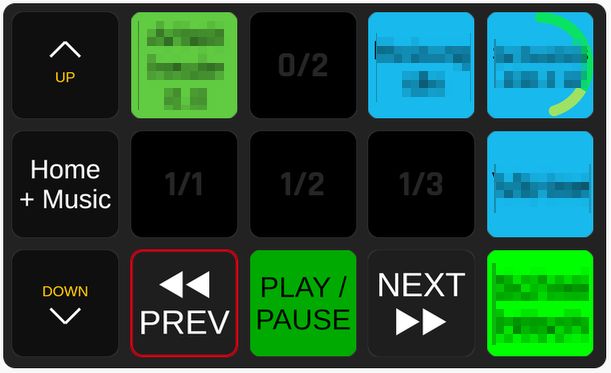
Transport actions
Transport-Aktionen
Play/Pause, Play, Pause, Stop, Next track and Previous track.
Play/Pause, Play, Pause, Stop, nächster Titel und vorheriger Titel.
Auto player selection
Automatische Playerwahl
Every action has a Player dropdown. Auto picks the playing player, or the first one found. Target a specific player when several run at once.
Jede Aktion hat ein Player-Dropdown. Auto wählt den laufenden Player oder den ersten gefundenen. Bei mehreren Playern lässt sich ein bestimmter gezielt ansteuern.
Playback feedback
Wiedergabe-Feedback
Colors a button depending on whether the selected player is Playing, Paused or Stopped.
Färbt eine Taste je nachdem, ob der gewählte Player spielt, pausiert oder gestoppt ist.
Live variables
Live-Variablen
player_name, playback_status, track_title, track_artist and track_album.
player_name, playback_status, track_title, track_artist und track_album.
Ready-made presets
Fertige Presets
Category MPRIS Transport Controls: Play/Pause with live feedback, Previous, Next, Stop, Play, Pause. Drag them onto a button.
Kategorie MPRIS Transport Controls: Play/Pause mit Live-Feedback, Previous, Next, Stop, Play, Pause. Per Drag-and-drop auf eine Taste ziehen.
Pure JS, no playerctl
Reines JS, kein playerctl
Talks to MPRIS directly via dbus-next. Falls back to $XDG_RUNTIME_DIR/bus when Companion starts the module without a session bus address.
Spricht MPRIS direkt über dbus-next. Fällt auf $XDG_RUNTIME_DIR/bus zurück, wenn Companion das Modul ohne Session-Bus-Adresse startet.
On your buttons
Auf deinen Tasten
Drag the presets onto a Companion page and you get transport keys that react to the player. Play/Pause changes its color with the playback status, and the variables put the current title, artist or album on any button.
Ziehe die Presets auf eine Companion-Seite, und du bekommst Transporttasten, die auf den Player reagieren. Play/Pause ändert seine Farbe mit dem Wiedergabestatus, und die Variablen zeigen aktuellen Titel, Künstler oder Album auf jeder Taste.
- Use variable references like
$(LABEL:track_title)in a button text, whereLABELis the name of your MPRIS connection - Pick Auto in the Player dropdown so the keys follow whichever player is playing
- Pin a key to one player when several run at once
- Nutze Variablenverweise wie
$(LABEL:track_title)im Tastentext, wobeiLABELder Name deiner MPRIS-Verbindung ist - Wähle Auto im Player-Dropdown, damit die Tasten dem gerade spielenden Player folgen
- Lege eine Taste auf einen Player fest, wenn mehrere gleichzeitig laufen
Installation
Installation
- Download the
.tgzfrom the Releases page. - In Companion open Settings → Modules → Import module package and select the file.
- Under Connections → Add connection search for “MPRIS” and add it. No configuration required.
- Lade das
.tgzvon der Releases-Seite herunter. - Öffne in Companion Settings → Modules → Import module package und wähle die Datei.
- Suche unter Connections → Add connection nach „MPRIS“ und füge es hinzu. Keine Konfiguration nötig.
Run from source
Aus dem Quellcode
For development. The packaged release above is the easy way.
Für die Entwicklung. Das fertige Release oben ist der einfache Weg.
- Clone the repo into a subfolder of a development folder, e.g.
~/companion-dev/mpris. - Run
npm installinside the module folder. - In the Companion launcher set Developer modules path to the parent folder, not the module folder.
- Restart Companion and add the “MPRIS” connection.
- Klone das Repo in einen Unterordner eines Entwicklungsordners, z. B.
~/companion-dev/mpris. - Führe
npm installim Modulordner aus. - Setze im Companion-Launcher den Developer modules path auf den übergeordneten Ordner, nicht auf den Modulordner.
- Starte Companion neu und füge die Verbindung „MPRIS“ hinzu.
Requirements
Voraussetzungen
- Linux with a running D-Bus session bus (standard on any desktop session)
- One or more MPRIS-capable players, e.g. Spotify or VLC
- Node.js 22+ (bundled with Companion; install separately for local testing)
- Linux mit laufendem D-Bus-Session-Bus (Standard in jeder Desktop-Sitzung)
- Ein oder mehrere MPRIS-fähige Player, z. B. Spotify oder VLC
- Node.js 22+ (in Companion enthalten; für lokale Tests separat installieren)
Changes
Änderungen
-
1.0.0
The first release: control MPRIS media players on Linux (Spotify, VLC, Firefox, Feishin, …) from Bitfocus Companion.Die erste Version: MPRIS-Mediaplayer unter Linux (Spotify, VLC, Firefox, Feishin, …) aus Bitfocus Companion steuern.
NewNeu
- Actions Play/Pause, Play, Pause, Stop, Next and Previous, each with a choice of player.Aktionen Play/Pause, Play, Pause, Stop, Weiter und Zurück, jede mit Wahl des Players.
- A feedback that colours a button by playback status (playing, paused, stopped), and variables with the current track.Ein Feedback, das eine Taste nach Wiedergabestatus färbt (spielt, pausiert, gestoppt), und Variablen mit dem aktuellen Titel.
- Ready-made presets: drag them onto a Companion page and get transport keys that react to the player.Fertige Presets: auf eine Companion-Seite ziehen und Transporttasten bekommen, die auf den Player reagieren.
NoteHinweis
- Install: download
generic-mpris-1.0.0.tgzfrom the release, then in Companion go to Settings → Modules → Import module package and select the file.Installation:generic-mpris-1.0.0.tgzvom Release laden, dann in Companion unter Settings → Modules → Import module package die Datei wählen.