
Fan Control
Lüftersteuerung
Auto, manual duty slider, and custom curve editor with drag-and-drop points. Hysteresis, rate limiting, per-fan overrides for Framework 16, and a calibration wizard for accurate RPM overlay.
Automatik, manueller Duty-Regler und Kurveneditor mit verschiebbaren Punkten. Hysterese, Ratenbegrenzung, Einstellungen pro Lüfter beim Framework 16 und ein Kalibrierassistent für eine genaue RPM-Anzeige.
Sensor Telemetry
Sensordaten
Live temperature graphs with configurable history window, per-sensor selection, and color-coded legend. Data sourced from the backend's telemetry collector.
Live-Temperaturdiagramme mit einstellbarem Zeitfenster, Auswahl pro Sensor und farbiger Legende. Die Daten kommen vom Telemetrie-Sammler des Backends.
Power Profiles
Energieprofile
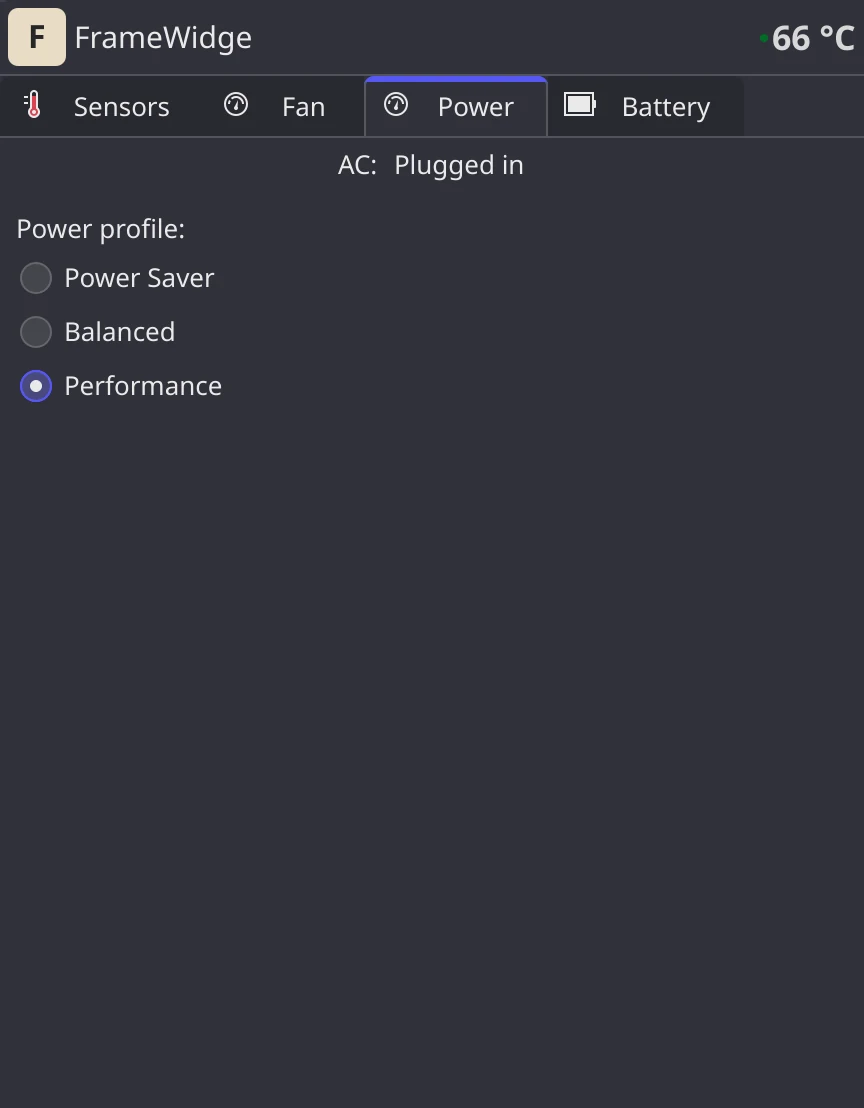
The system power profile: Power Saver, Balanced or Performance, the same switch as Plasma's battery applet (power-profiles-daemon or tuned-ppd).
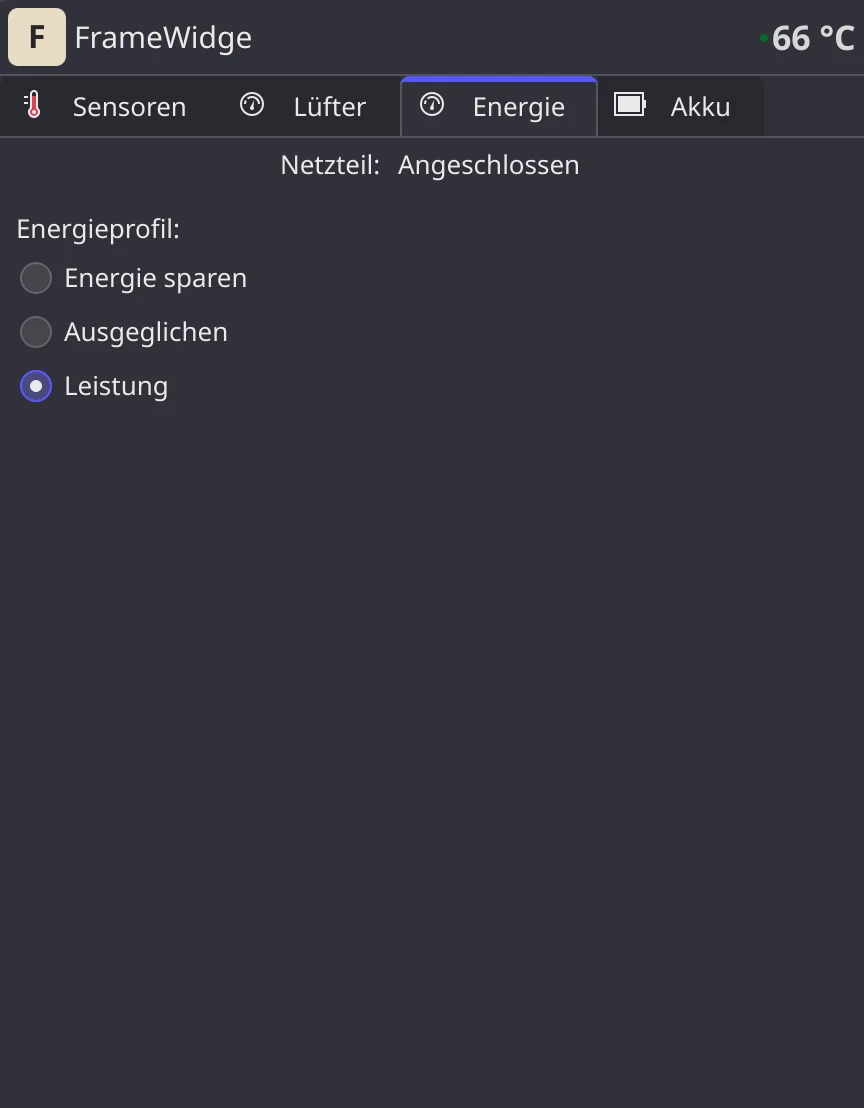
Das Energieprofil des Systems: Energie sparen, Ausgeglichen oder Leistung, derselbe Schalter wie in Plasmas Akku-Applet (power-profiles-daemon oder tuned-ppd).
Battery Management
Akkuverwaltung
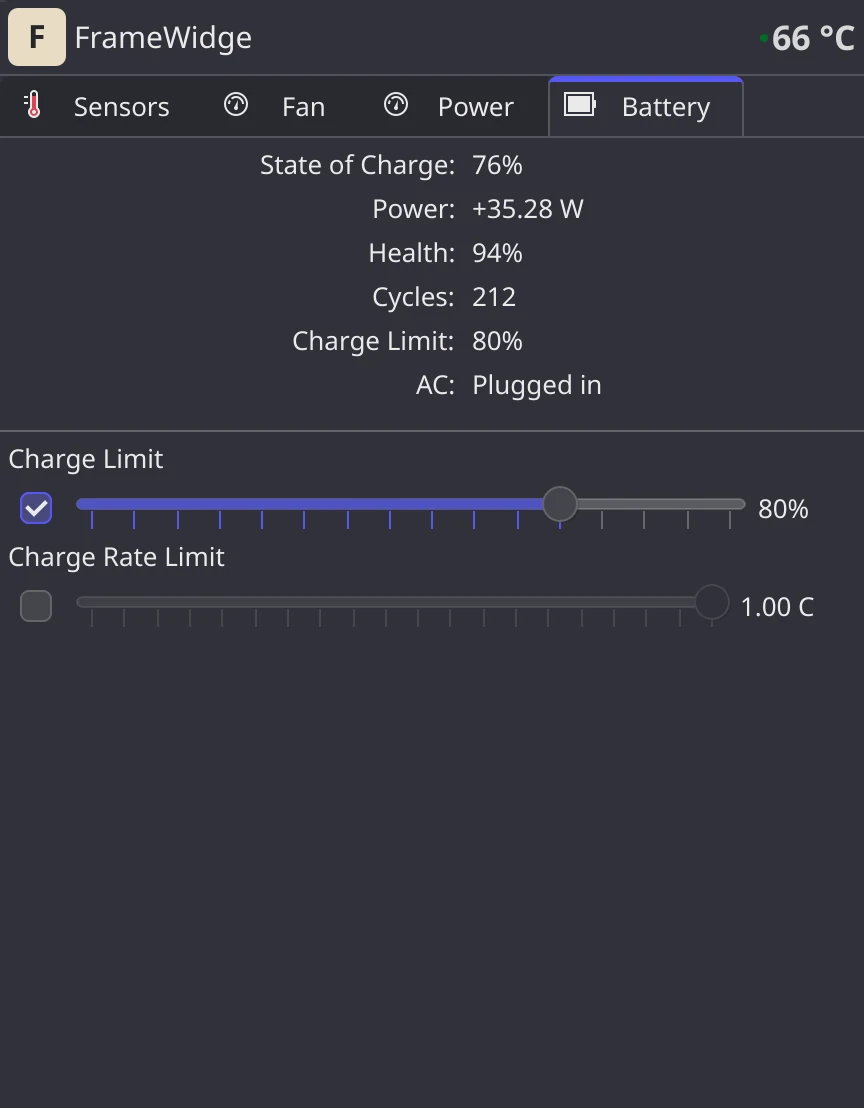
Live charge/discharge wattage, health percentage, cycle count, charge limit (25–100%), and charge rate limiting with optional SoC threshold. ETA to full or empty.
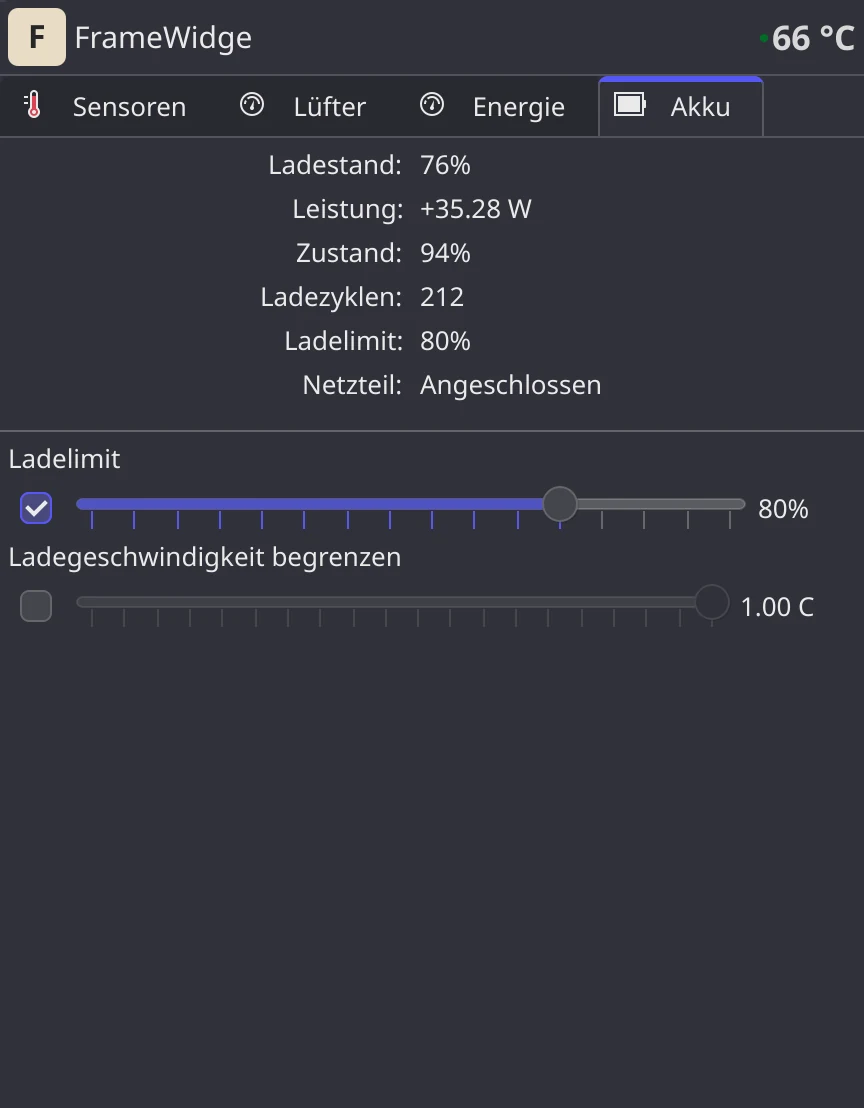
Live-Lade- und Entladeleistung, Gesundheit in Prozent, Ladezyklen, Ladelimit (25–100 %) und Ladeleistungsbegrenzung mit optionaler SoC-Schwelle. Restzeit bis voll oder leer.
System Tray
Systemtray
Compact icon with configurable overlay (temperature, RPM, or SoC). Rich tooltip with live stats. Dims when the service is offline.
Kompaktes Symbol mit einstellbarer Einblendung (Temperatur, RPM oder Ladestand). Ausführlicher Tooltip mit Live-Werten. Wird abgedunkelt, wenn der Dienst offline ist.
Smart Onboarding
Geführte Einrichtung
When the backend is not installed, the widget shows a friendly setup guide with a copyable install command — no terminal hunting required.
Ist das Backend nicht installiert, zeigt das Widget eine Einrichtungsanleitung mit kopierbarem Installationsbefehl – ohne Suche im Terminal.
Fan curves you can drag
Lüfterkurven zum Ziehen
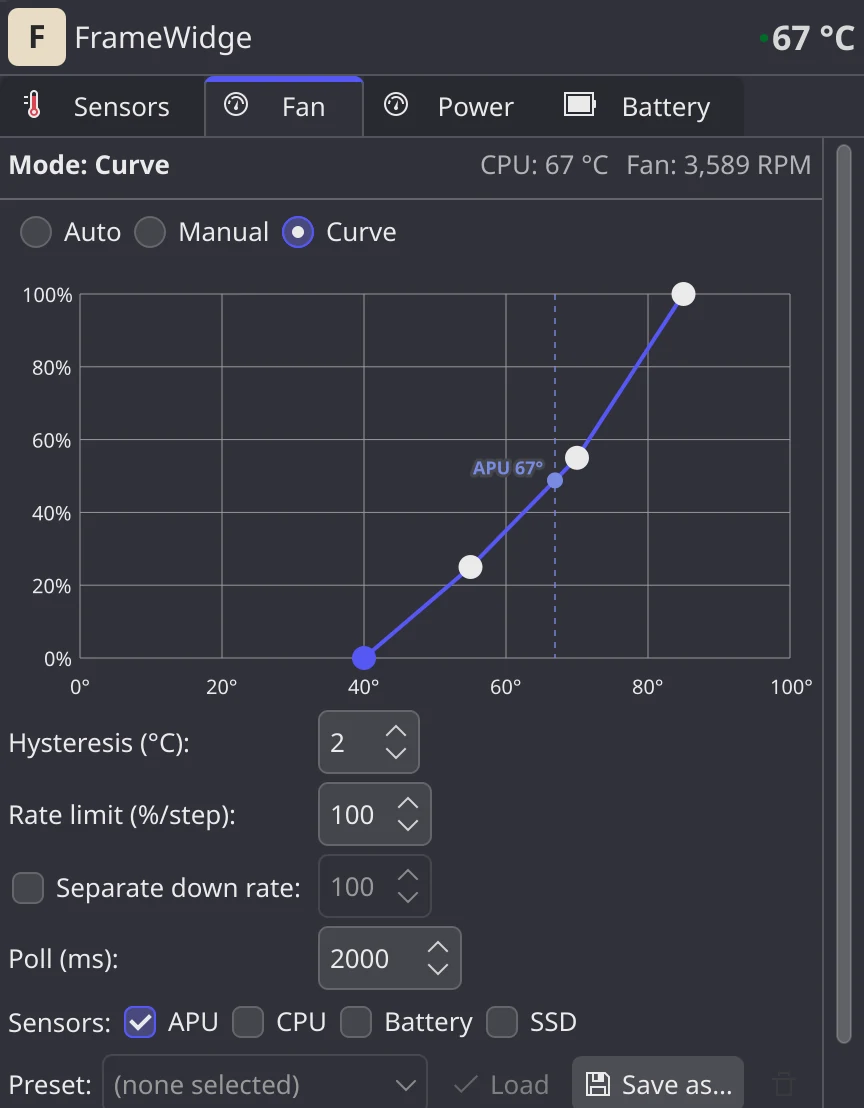
Pick Auto, Manual or Curve. The curve editor is a graph you click and drag: click to add a point, drag to move it, double-click to remove it. The live sensor readings are drawn as dashed guides, so you see where the fan sits on the curve right now.
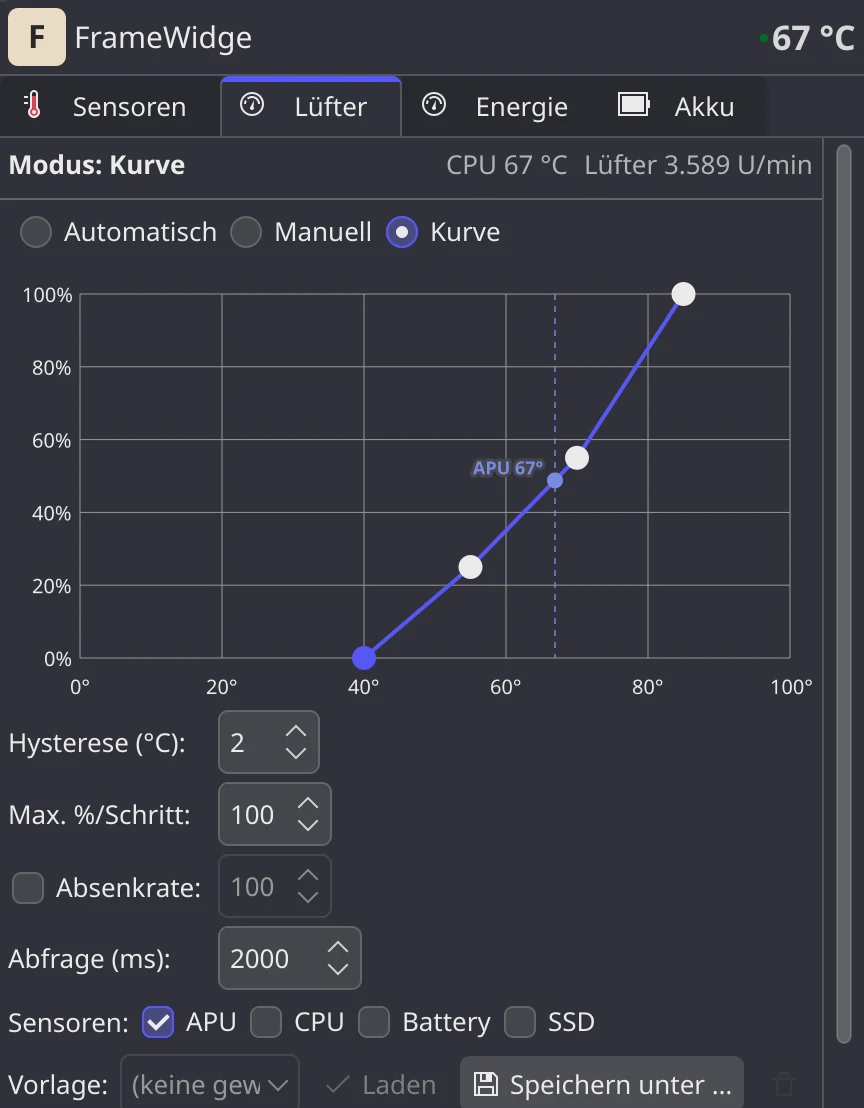
Wähle Auto, Manuell oder Kurve. Der Kurveneditor ist ein Diagramm, das du anklickst und ziehst: Klick fügt einen Punkt hinzu, Ziehen verschiebt ihn, Doppelklick entfernt ihn. Die aktuellen Sensorwerte erscheinen als gestrichelte Hilfslinien, sodass du siehst, wo der Lüfter gerade auf der Kurve steht.
- Hysteresis and rate limit (with an optional separate down rate) keep the fan from hunting
- Sensor selection: the curve follows the hottest of the sensors you tick
- Presets save a curve with its settings; a preset can be tied to a Plasma Activity and switches on when that Activity becomes current
- A calibration wizard and per-fan overrides on the Framework 16 for accurate RPM values
- Hysterese und Ratenbegrenzung (mit optional eigener Absenkrate) verhindern, dass der Lüfter hin und her springt
- Sensorauswahl: Die Kurve folgt dem heißesten der angehakten Sensoren
- Presets speichern eine Kurve samt Einstellungen; ein Preset lässt sich an eine Plasma-Aktivität binden und schaltet sich ein, sobald diese Aktivität aktuell wird
- Ein Kalibrierassistent und Einstellungen pro Lüfter beim Framework 16 für genaue RPM-Werte
Temperatures over time
Temperaturen im Zeitverlauf
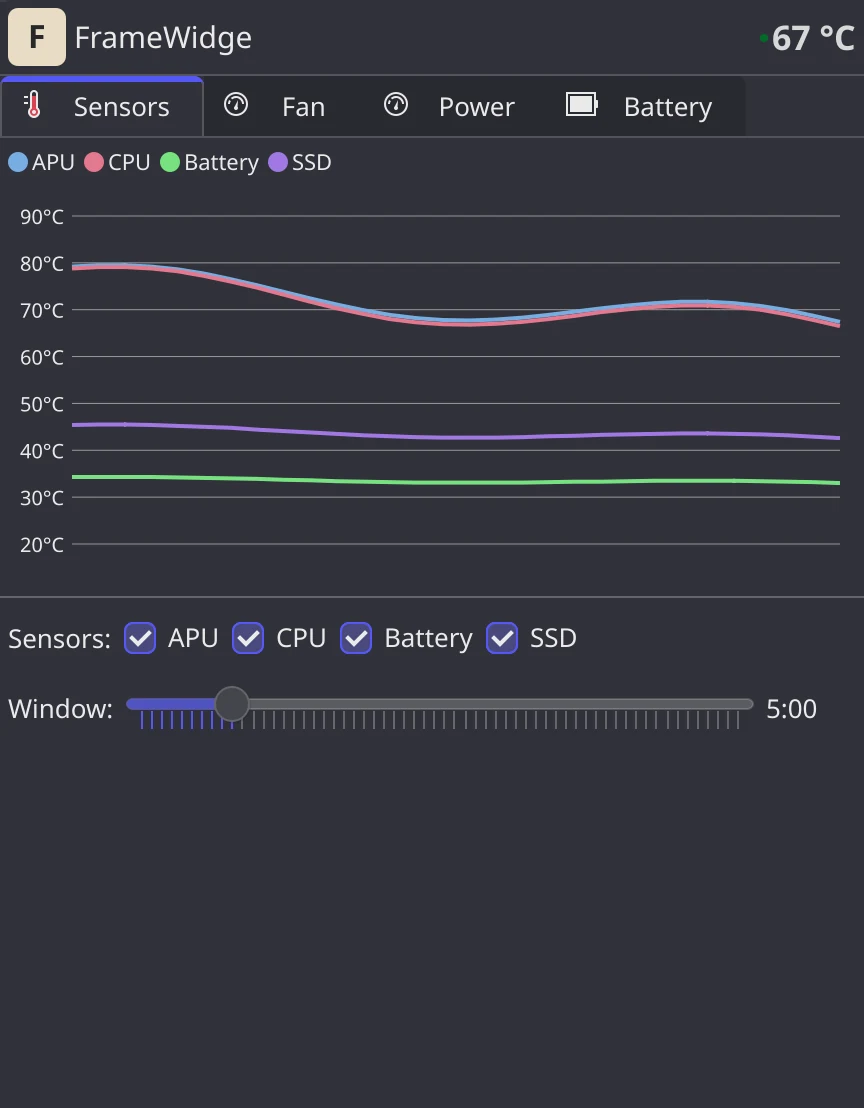
The Sensors tab draws one line per sensor with a color-coded legend. Tick the sensors you care about and stretch or shrink the time window with the slider.
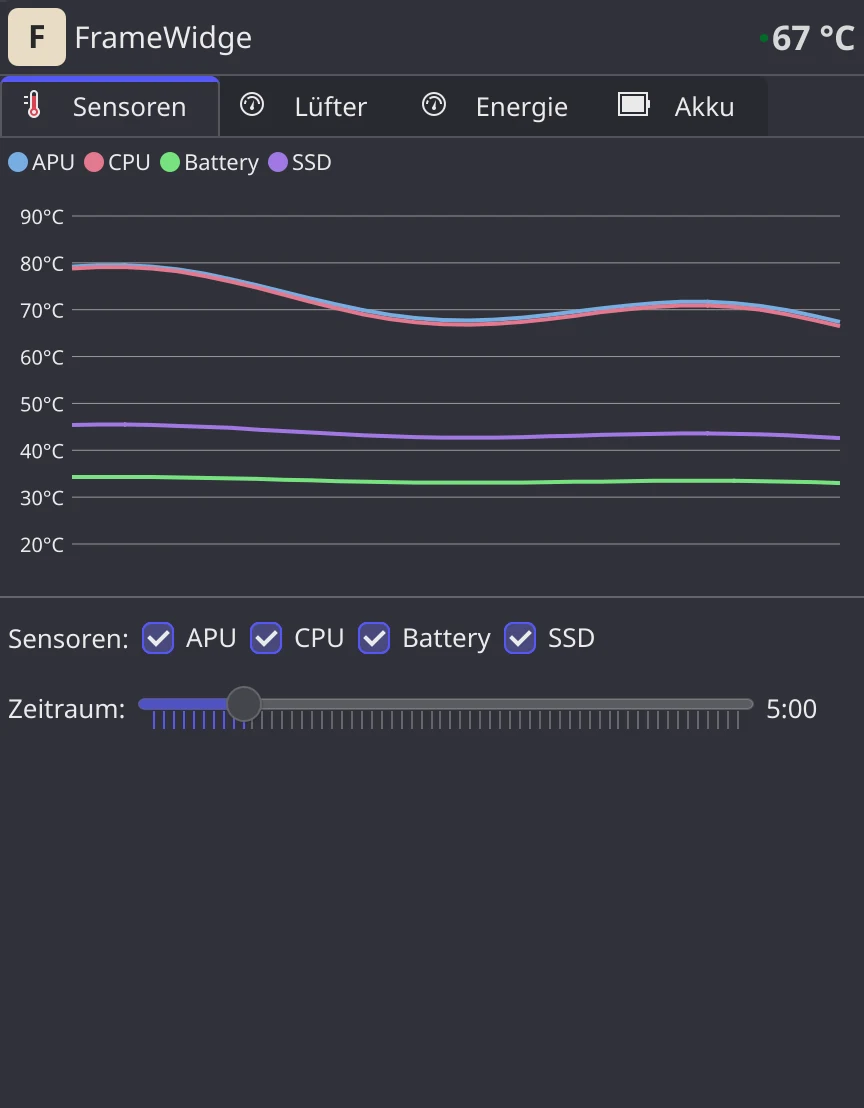
Der Sensoren-Tab zeichnet pro Sensor eine Linie mit farbiger Legende. Hake die Sensoren an, die dich interessieren, und ziehe das Zeitfenster mit dem Regler größer oder kleiner.
- History comes from the backend's telemetry collector, so the graph is filled as soon as you open the popup
- The same sensor colors are used for the live markers in the fan curve editor
- The header always shows the current temperature
- Der Verlauf kommt vom Telemetrie-Sammler des Backends, das Diagramm ist also beim Öffnen des Popups sofort gefüllt
- Dieselben Sensorfarben erscheinen als Live-Marker im Kurveneditor der Lüfter
- Die Kopfzeile zeigt immer die aktuelle Temperatur
One power profile for the whole system
Ein Energieprofil für das ganze System
The Power tab shows whether the laptop is plugged in and switches the system power profile: Power Saver, Balanced or Performance. It is the same setting as in Plasma's battery applet, so the two never disagree.
Der Energie-Tab zeigt, ob der Laptop am Netz hängt, und wechselt das Energieprofil des Systems: Energie sparen, Ausgeglichen oder Leistung. Es ist dieselbe Einstellung wie in Plasmas Akku-Applet, die beiden widersprechen sich also nie.
- power-profiles-daemon or tuned-ppd sets the CPU's energy preference and the firmware's platform profile
- Fan curve presets can switch by themselves when you plug in or unplug
- power-profiles-daemon oder tuned-ppd setzt die Energievorgabe der CPU und das Plattformprofil der Firmware
- Lüfterkurven-Presets können beim Ein- und Ausstecken von selbst wechseln
Protect the battery
Den Akku schonen
The Battery tab shows state of charge, power flow, health and cycle count. A charge limit stops charging at the level you choose, and an optional charge rate limit slows charging down.
Der Akku-Tab zeigt Ladestand, Leistungsfluss, Gesundheit und Zyklenzahl. Ein Ladelimit stoppt das Laden bei dem Wert, den du wählst, und ein optionales Ladeleistungslimit bremst das Laden.
- Charge limit from 25 to 100 percent
- Charge rate limit in C, with an optional state-of-charge threshold
- Live wattage while charging or discharging, plus the time to full or empty
- Ladelimit von 25 bis 100 Prozent
- Ladeleistungslimit in C, mit optionaler Ladestand-Schwelle
- Live-Leistung beim Laden und Entladen sowie die Zeit bis voll oder leer
The tray icon
Das Tray-Symbol
The compact icon is more than a launcher. It can show a live number, colors it by value and turns into a tooltip with the details.
Das kompakte Symbol ist mehr als ein Starter. Es kann eine Zahl live anzeigen, färbt sie nach Wert und wird zum Tooltip mit den Details.
| Tray displayTray-Anzeige | ShowsZeigt |
|---|---|
| CPU temperatureCPU-Temperatur | The current temperature as a number on the iconDie aktuelle Temperatur als Zahl auf dem Symbol |
| Fan RPMLüfter-RPM | The current fan speedDie aktuelle Lüfterdrehzahl |
| Battery %Akku % | The state of chargeDen Ladestand |
| Icon onlyNur Symbol | The chip icon with a small status dot graded by temperatureDas Chip-Symbol mit einem kleinen, nach Temperatur gefärbten Statuspunkt |
- Also show the icon stacks the chip icon above the number
- Overlay size scales the number from 50 to 200 percent
- Value colors are editable bands per mode, using theme colors or your own hex values
- The tooltip lists CPU temperature, fan RPM, battery and fan mode
- The icon dims when the backend is not reachable
- Symbol zusätzlich anzeigen stapelt das Chip-Symbol über der Zahl
- Overlay-Größe skaliert die Zahl von 50 bis 200 Prozent
- Wertefarben sind pro Modus einstellbare Bänder, mit Theme-Farben oder eigenen Hex-Werten
- Der Tooltip nennt CPU-Temperatur, Lüfter-RPM, Akku und Lüftermodus
- Das Symbol wird abgedunkelt, wenn das Backend nicht erreichbar ist
How it works
So funktioniert es
The widget is the frontend. The privileged work happens in its own service, framewidged, which the widget reaches over the system D-Bus.
Das Widget ist die Oberfläche. Die Arbeit mit Root-Rechten macht der eigene Dienst framewidged, den das Widget über den System-D-Bus erreicht.
- The framewidged service runs as a root systemd unit and communicates with the laptop's embedded controller via
framework_tool. - It offers a D-Bus interface for reading sensors, setting fan modes, switching the power profile and configuring battery limits. polkit lets the person at the laptop change settings without a password.
- This Plasma widget is a pure QML frontend that polls the API and sends config changes. No C++ compilation.
- All settings persist in
/var/lib/framewidged/config.jsonand are applied at boot by the service.
- Der Dienst framewidged läuft als systemd-Unit mit Root-Rechten und spricht über
framework_toolmit dem Embedded Controller des Laptops. - Er bietet eine D-Bus-Schnittstelle, um Sensoren zu lesen, Lüftermodi zu setzen, das Energieprofil zu wechseln und Akkulimits einzustellen. polkit erlaubt der Person am Laptop Änderungen ohne Passwort.
- Dieses Plasma-Widget ist ein reines QML-Frontend, das die API abfragt und Konfigurationsänderungen sendet. Kein C++-Build.
- Alle Einstellungen liegen in
/var/lib/framewidged/config.jsonund werden beim Start vom Dienst angewendet.
Requirements
Voraussetzungen
- Framework Laptop — 13 or 16 (AMD or Intel)
- KDE Plasma 6.1 or newer — Wayland or X11
- Linux with systemd — Arch, Fedora, NixOS, etc.
- framewidged service — installed by the install script
- Framework-Laptop – 13 oder 16 (AMD oder Intel)
- KDE Plasma 6.1 oder neuer – Wayland oder X11
- Linux mit systemd – Arch, Fedora, NixOS usw.
- Dienst framewidged – wird vom Installationsskript installiert
Install
Installation
- Run the one-liner from the box above. It asks which release channel to install: Stable, Beta or Main.
- The script installs the framewidged service (this needs
sudo) and the widget withkpackagetool6. A running framework-control is stopped and disabled; its fan and battery settings are taken over. - Add FrameWidge from the Plasma widget picker to your panel or system tray.
- If the service is not running, the widget shows a setup screen with the install command and the
systemctlstart command to copy.
- Führe den Einzeiler aus der Box oben aus. Er fragt, welchen Release-Kanal du installieren willst: Stable, Beta oder Main.
- Das Skript installiert den Dienst framewidged (dafür braucht es
sudo) und das Widget mitkpackagetool6. Ein laufendes framework-control wird gestoppt und abgeschaltet, seine Lüfter- und Akku-Einstellungen werden übernommen. - Füge FrameWidge im Widget-Auswahldialog deinem Panel oder Systemtray hinzu.
- Läuft der Dienst nicht, zeigt das Widget eine Einrichtungsseite mit dem Installationsbefehl und dem
systemctl-Startbefehl zum Kopieren.
Prefer to do it by hand? Build and install the service and the plasmoid separately, update from a checkout and remove the widget with kpackagetool6.
Lieber von Hand? Baue und installiere Dienst und Plasmoid getrennt, aktualisiere aus einem Checkout und entferne das Widget mit kpackagetool6.
Configuration
Konfiguration
Right-click the widget and choose Configure. There are two pages: General for the widget itself and System Info for everything that talks to the backend.
Rechtsklick auf das Widget und Einrichten. Es gibt zwei Seiten: Allgemein für das Widget selbst und Systeminfo für alles, was mit dem Backend spricht.
| SettingEinstellung | DefaultStandard | What it doesWas sie macht |
|---|---|---|
| Poll intervalAbfrageintervall | 2000 ms | How often health and data are polledWie oft Zustand und Daten abgefragt werden |
| Tray displayTray-Anzeige | temp | temp, rpm, soc or icontemp, rpm, soc oder icon |
| Overlay size and colorsOverlay-Größe und Farben | 100 % | Size of the number on the icon and the color bands per modeGröße der Zahl auf dem Symbol und die Farbbänder pro Modus |
| System Info pageSeite Systeminfo | – | System and version info, telemetry poll settings and log viewerSystem- und Versionsinfo, Telemetrie-Einstellungen und Log-Ansicht |
Fan and battery settings and the fan curve presets are stored by the service in /var/lib/framewidged/config.json and applied at boot. The power profile belongs to the system (power-profiles-daemon).
Lüfter- und Akku-Einstellungen und die Lüfterkurven-Presets speichert der Dienst in /var/lib/framewidged/config.json und wendet sie beim Start an. Das Energieprofil gehört dem System (power-profiles-daemon).
Questions
Fragen
Is this an official Framework or framework-control project?Ist das ein offizielles Framework- oder framework-control-Projekt?
No. FrameWidge is an independent project. Its service ports parts of ozturkkl/framework-control (MIT), which was its backend up to version 1.2.
Nein. FrameWidge ist ein unabhängiges Projekt. Sein Dienst übernimmt Teile von ozturkkl/framework-control (MIT), das bis Version 1.2 sein Backend war.
Why does it install a service?Warum installiert es einen Dienst?
The widget cannot talk to the embedded controller itself. The framewidged service does that as root and exposes the values over a local API. The KDE Store package contains only the widget, so the one-liner installs both.
Das Widget kann nicht selbst mit dem Embedded Controller sprechen. Das erledigt der Dienst framewidged als root und stellt die Werte über eine lokale API bereit. Das Paket aus dem KDE Store enthält nur das Widget, deshalb installiert der Einzeiler beides.
The widget says "Service Not Reachable"Das Widget meldet „Service Not Reachable“
The service is missing or stopped. The widget shows the install command and the systemctl command to start it.
Der Dienst fehlt oder ist gestoppt. Das Widget zeigt den Installationsbefehl und den systemctl-Befehl zum Starten.
Which laptops work?Welche Laptops funktionieren?
Framework Laptop 13 and 16, AMD or Intel, on KDE Plasma 6.1 or newer with Wayland or X11 and systemd. The Power tab needs power-profiles-daemon or tuned-ppd.
Framework Laptop 13 und 16, AMD oder Intel, unter KDE Plasma 6.1 oder neuer mit Wayland oder X11 und systemd. Der Energie-Tab braucht power-profiles-daemon oder tuned-ppd.
Where are my settings stored?Wo werden meine Einstellungen gespeichert?
Fan and battery settings and the fan curve presets live in the service, in /var/lib/framewidged/config.json, and are applied at boot even without the widget. The power profile belongs to the system (power-profiles-daemon). Widget settings live in the widget configuration.
Lüfter- und Akku-Einstellungen und die Lüfterkurven-Presets liegen im Dienst, in /var/lib/framewidged/config.json, und werden beim Start auch ohne Widget angewendet. Das Energieprofil gehört dem System (power-profiles-daemon). Widget-Einstellungen liegen in der Widget-Konfiguration.
Is it safe to use?Ist die Nutzung sicher?
The project is vibe-coded and in beta, and fan curves change how your laptop cools itself. Start with Auto, change one thing at a time and keep an eye on the temperatures. Use at your own risk.
Das Projekt ist vibe-codiert und in der Beta, und Lüfterkurven ändern, wie dein Laptop sich kühlt. Beginne mit Auto, ändere jeweils nur eine Sache und behalte die Temperaturen im Blick. Nutzung auf eigene Gefahr.
Roadmap
Roadmap
The widget is in beta. Next up: AUR and COPR packages.
Das Widget ist in der Beta. Als Nächstes: AUR- und COPR-Pakete.
Details in the roadmap.
Details in der Roadmap.
Changes
Änderungen
What each release brought, newest first. Every release adds an entry here and the same notes on the release page.
Was jede Version gebracht hat, die neueste zuerst. Jede Version bekommt hier einen Eintrag und dieselben Notizen auf der Release-Seite.
-
1.3
FrameWidge brings its own service, framewidged, instead of depending on framework-control, whose 0.5.5 had moved the fan settings out of reach. The widget talks to it over D-Bus, the Power tab switches the system power profile, and the popup can take the Kante look.FrameWidge bringt seinen eigenen Dienst mit, framewidged, statt von framework-control abzuhängen, dessen Version 0.5.5 die Lüftereinstellungen unerreichbar gemacht hatte. Das Widget spricht über D-Bus mit ihm, der Energie-Tab schaltet das Energieprofil des Systems, und das Fenster kann das Kante-Aussehen annehmen.
NewNeu
- Own service
framewidged(Rust): fan curve and manual duty (also per fan), charge limit and charge rate, sensor history. It reads sensors and battery from the kernel and writes to the embedded controller through Framework'sframework_tool.Eigener Dienstframewidged(Rust): Lüfterkurve und feste Drehzahl (auch je Lüfter), Ladegrenze und Laderate, Sensorverlauf. Er liest Sensoren und Akku aus dem Kernel und schreibt über Frameworksframework_toolin den Embedded Controller. - The widget talks to the service over the system bus; changing settings is checked by polkit (free for the person at the laptop, an admin password for anyone else).Das Widget spricht über den Systembus mit dem Dienst; Änderungen prüft polkit (frei für die Person am Laptop, ein Admin-Passwort für alle anderen).
- Power tab: the system power profile (Power Saver, Balanced, Performance) through power-profiles-daemon or tuned-ppd, the same setting as Plasma's battery applet.Energie-Tab: das Energieprofil des Systems (Energiesparen, Ausgewogen, Leistung) über power-profiles-daemon oder tuned-ppd, dieselbe Einstellung wie im Akku-Applet von Plasma.
- Fan curve presets live in the service and can switch on by themselves when the laptop is plugged in or unplugged, also with the widget closed.Lüfterkurven-Presets liegen im Dienst und können sich beim Ein- oder Ausstecken des Netzteils selbst einschalten, auch bei geschlossenem Widget.
- Style setting for the popup: System (default), Kante or Kante Light. The Kante styles draw the fan curve, the sensor chart with hover read-out and legend, the tray colour bands and the install commands with Kante's own elements.Stil-Einstellung für das Fenster: System (Standard), Kante oder Kante Light. Die Kante-Stile zeichnen Lüfterkurve, Sensordiagramm mit Anzeige beim Überfahren und Legende, die Farbbänder des Tray-Symbols und die Installationsbefehle mit Kantes eigenen Elementen.
- German translation of the widget.Deutsche Übersetzung des Widgets.
ImprovedVerbessert
- When the service stops or crashes, the fans go back to the firmware's own curve; so they do when a curve has no temperature to follow, until readings return.Stoppt oder stürzt der Dienst ab, kehren die Lüfter zur eigenen Kurve der Firmware zurück; ebenso, wenn eine Kurve keine Temperatur zum Folgen hat, bis wieder Messwerte kommen.
- No tab scrolls at the default popup size: the popup is taller and each tab scrolls by its own height; the sensor choice and time range show without scrolling.Bei der Standardgröße scrollt kein Tab: Das Fenster ist höher, und jeder Tab scrollt nach seiner eigenen Höhe; Sensorwahl und Zeitraum stehen ohne Scrollen da.
- Sensors carry the names of the current
framework_tool(0.6.6), such ascpu@4candAPU Fan.Sensoren tragen die Namen des aktuellenframework_tool(0.6.6), etwacpu@4cundAPU Fan. - Sensor line colours in the System style are spread evenly; CPU and Battery no longer share one colour.Die Linienfarben der Sensoren im System-Stil sind gleichmäßig verteilt; CPU und Akku teilen sich keine Farbe mehr.
uninstall.shoffers to remove the service too.uninstall.shbietet an, auch den Dienst zu entfernen.
FixedBehoben
- Fan curve: switching the separate down rate off took no effect; the old rate stayed.Lüfterkurve: Das Ausschalten der eigenen Abwärtsrate wirkte nicht; die alte Rate blieb.
- The Fan page fits the popup: hysteresis, rate limits and poll interval stack one per row on narrow popups instead of clipping the curve editor.Die Lüfterseite passt ins Fenster: Hysterese, Ratengrenzen und Abfrageintervall stehen in schmalen Fenstern je in einer Zeile, statt den Kurveneditor abzuschneiden.
- System curve editor: marker captions move left of the guide when a point's handle would cover them.Kurveneditor im System-Stil: Die Beschriftungen der Markierungen rücken links neben die Hilfslinie, wenn der Griff eines Punkts sie verdecken würde.
All changes since 1.2 →Alle Änderungen seit 1.2 →NoteHinweis
install.shinstallsframewidgedwith its D-Bus policy and polkit action, andframework_toolif missing, and stops and disables framework-control. On its first start framewidged takes over/etc/framework-control/config.json(fan settings of the active profile, calibration of the first fan, battery, telemetry); presets saved with 1.2 and fan curves with the old sensor names are moved over once.install.shinstalliertframewidgedmit seiner D-Bus-Richtlinie und polkit-Aktion und, falls es fehlt,framework_tool, und stoppt und deaktiviert framework-control. Beim ersten Start übernimmt framewidged/etc/framework-control/config.json(Lüftereinstellungen des aktiven Profils, Kalibrierung des ersten Lüfters, Akku, Telemetrie); mit 1.2 gespeicherte Presets und Lüfterkurven mit den alten Sensornamen werden einmal übernommen.- Needs Plasma 6.1 or newer. The service port setting and the web UI link are gone.Braucht Plasma 6.1 oder neuer. Die Einstellung für den Dienst-Port und der Link zur Web-Oberfläche entfallen.
- The separate AC and battery settings for governor, EPP, frequency limits, TDP and thermal limit are gone: they fought with the power profile daemon over the same files.Die getrennten Netz- und Akku-Einstellungen für Governor, EPP, Frequenzgrenzen, TDP und Temperaturgrenze entfallen: Sie stritten mit dem Energieprofil-Dienst um dieselben Dateien.
- Kante's line chart has no time axis yet; the hover read-out shows the time.Das Liniendiagramm von Kante hat noch keine Zeitachse; die Anzeige beim Überfahren zeigt die Uhrzeit.
- Own service
-
1.2
A new logo.Ein neues Logo.
All changes since 1.1 →Alle Änderungen seit 1.1 →ImprovedVerbessert
- The tray uses a monochrome logo that follows the panel's text colour; the app icon uses the variant with the colour accent.Das Tray-Symbol nutzt ein einfarbiges Logo, das der Textfarbe des Panels folgt; das App-Symbol die Variante mit Farbakzent.
-
1.1
The tray shows its values from the start, and FrameWidge is in the KDE Store.Das Tray-Symbol zeigt seine Werte von Anfang an, und FrameWidge ist im KDE Store.
FixedBehoben
- The tray overlay (temperature, RPM or charge) loads its data at startup instead of staying empty until the popup is opened for the first time.Die Anzeige auf dem Tray-Symbol (Temperatur, Drehzahl oder Ladestand) lädt ihre Daten beim Start, statt leer zu bleiben, bis das Fenster zum ersten Mal geöffnet wird.
All changes since 1.0 →Alle Änderungen seit 1.0 →NoteHinweis
- The widget is available in the KDE Store; its description points to the install script, which also sets up the backend.Das Widget gibt es im KDE Store; seine Beschreibung verweist auf das Installationsskript, das auch das Backend einrichtet.
Older releasesÄltere Versionen
-
1.0
The first release of FrameWidge, a KDE Plasma 6 tray widget for Framework laptops on top of the framework-control backend.Die erste Version von FrameWidge, einem Tray-Widget für KDE Plasma 6 auf Framework-Laptops, auf dem Backend framework-control.
NewNeu
- Fan control: auto, manual duty, a drag-and-drop curve editor, hysteresis, rate limits, per-fan overrides (Framework 16) and a calibration wizard.Lüftersteuerung: automatisch, feste Drehzahl, ein Kurveneditor zum Ziehen, Hysterese, Ratengrenzen, Einstellungen je Lüfter (Framework 16) und ein Kalibrierungsassistent.
- Sensors: live temperature graphs with a sensor choice and an adjustable time window.Sensoren: Temperaturverläufe in Echtzeit mit Sensorwahl und einstellbarem Zeitfenster.
- Power: AC and battery profiles, EPP, governor, frequency limits, TDP and thermal controls, as far as the hardware offers them.Energie: Profile für Netz und Akku, EPP, Governor, Frequenzgrenzen, TDP und Temperaturgrenzen, soweit die Hardware sie bietet.
- Battery: charge and discharge power, health, cycles, charge limit (25–100 %) and a charge rate limit.Akku: Lade- und Entladeleistung, Zustand, Zyklen, Ladegrenze (25–100 %) und eine Begrenzung der Laderate.
- Tray: temperature, RPM or charge on the icon, and a tooltip with live values.Tray: Temperatur, Drehzahl oder Ladestand auf dem Symbol und ein Tooltip mit aktuellen Werten.
- A setup guide when the backend is missing or stopped.Eine Einrichtungshilfe, wenn das Backend fehlt oder gestoppt ist.